Appearance
Recover Your Data
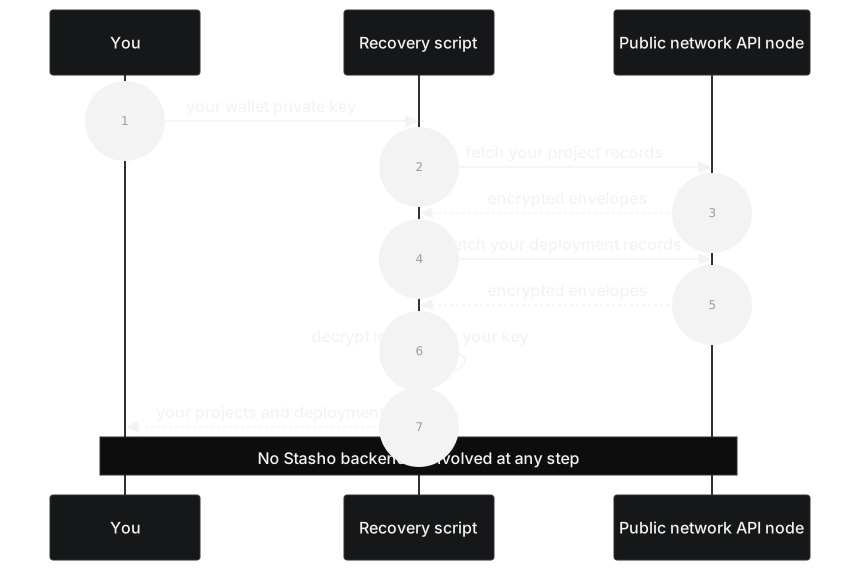
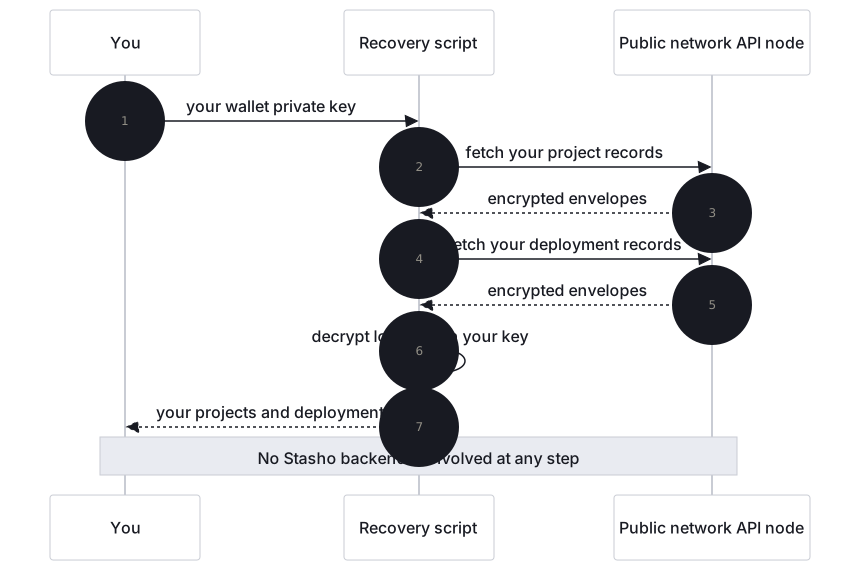
This guide walks you through reconstructing your full Stasho project and deployment history using only your wallet's private key. The recovery script does not depend on our backend: it talks directly to the public network your records are stored on. The stasho CLI plays no part here, because it talks to our API and recovery must work without it.
The script isn't public yet
Today you have two options: email hello@stasho.xyz and we'll send you a copy, or build your own tool from the storage schema, which is published in full and language-agnostic. Get one of them before you export any key.
Use only a copy that answers an email you sent. We never email it unasked and never ask for your key. Before you install it, read it: package.json has no install scripts and two runtime dependencies (eciesjs, ethers), and the source talks only to the API node you name (--aleph-api, by default https://api.aleph.im).
Network: records are Aleph messages on mainnet; API: https://api.aleph.im (the script's default; any public API node works, e.g. https://api2.aleph.im).
This key controls your wallet, not just your Stasho data. An agent that runs with the key in its environment can read it. For a wallet that holds funds, run step 2 yourself and give the agent only the output, using the second prompt.
Prompt for your agent
Copy this into Claude Code, Cursor or any agent that can run shell commands, and swap the placeholder. Use it only if you accept the warning above.
text
Read https://docs.stasho.xyz/guides/recover-your-data.md and rebuild my Stasho project and
deployment history from the public network, without the Stasho backend. The script is not
public: my copy is in <SCRIPT_FOLDER>, and it answers an email I sent. If I have no copy, stop and
tell me to ask hello@stasho.xyz for one before I export any key. Before installing, read
package.json and the source as the page says, and stop if they differ. My wallet key is in the USER_PRIVATE_KEY environment variable
and my address is <WALLET_ADDRESS>: never ask me for the key in chat, never print it, never pass
it as a flag, and never write it anywhere. Run the recovery script, then tell me the counts from its output line and list every
warning with its code. Do not print the output file's projects: they hold my decrypted data. If
the variable is not set because I signed in with email, Google, GitHub or Apple, read me the
page's Privy Home step and stop: you never drive that export.
When to use this
- You no longer trust the platform and want to verify your data is portable
- The platform has gone away (bankrupt, compromised, taken down)
- You want to migrate your project history to a new tool
- You want to audit what data exists about your projects on the public network
If Stasho itself may be compromised or gone, don't rely on an email from us: build your own tool from the storage schema, so none of our code touches your key.
What you need
The recovery script. We send you a copy when you ask at hello@stasho.xyz. Check it as the box at the top says.
Node.js 22 or later. Verify with
node --version.Your wallet address. The 0x-prefixed Ethereum address you used to sign in.
Your wallet's private key. Export it from the wallet app you sign in with; in MetaMask it is under the account's details. The script never transmits this key anywhere; it only uses it locally to decrypt your data. A hardware wallet cannot export its key, and the script takes a raw key only: don't type its seed into software to get one.
If you signed in with email, Google, GitHub or Apple, your wallet is an embedded one held through Privy, and Stasho's dashboard has no export control. Export is available at Privy Home (https://home.privy.io). Its sign-in asks for an email address: use the one on your Stasho sign-in, accept Privy's terms if asked, connect your Google, GitHub or Apple account from there if your wallet doesn't show, and export the Ethereum wallet's key. This step depends on Privy, not on Stasho, so do it now if independence matters to you. If your wallet doesn't show, or Privy is unavailable, this script can't run for your wallet. A key for a different wallet stops the script at exit code
12, which prints the address it derives to.
Steps
1. Install the script
In the folder we sent you (scripts/recovery/, if you have access to the repository), once you have read it:
bash
npm ci --ignore-scripts2. Run it
The script reads your private key from the USER_PRIVATE_KEY environment variable. Never pass it as a CLI flag, and never type it after export on one line: either would leak it into your shell history. Read it from the terminal instead, which prints nothing as you paste. The parentheses run this in a subshell, so nothing started later in that terminal inherits the key:
bash
( printf 'Wallet key: '; read -rs USER_PRIVATE_KEY; echo; export USER_PRIVATE_KEY
  npm run recover -- --address 0xYOUR_WALLET_ADDRESS --output ./my-recovery.json )
Or pipe it from a password manager with --stdin, which reads the key from standard input instead of the environment. With 1Password's CLI, for example:
bash
op read "op://Private/My wallet/private key" \
  | npm run recover -- --stdin --address 0xYOUR_WALLET_ADDRESS --output ./my-recovery.json
The other options are --channel, --aleph-api and --verbose.
You should see output like:
[recover] Wrote 3 projects, 21 deployments, 0 warnings to ./my-recovery.jsonThe script exits 0 when it wrote the file. Otherwise:
| Exit code | Meaning |
|---|---|
2 | --address or --output is missing |
10 | No private key: USER_PRIVATE_KEY is not set, or --stdin read nothing |
11 | The key is not 32 bytes of hex |
12 | The key derives to a different address than --address |
20 | The network API is unreachable |
99 | Anything else; the message says what |
3. Inspect the output
Open my-recovery.json. You'll see a JSON document with:
wallet: the address you recoveredrecoveredAt: timestamp of the recoveryalephApiUrlandchannel: where it read fromstats: counts of messages read, projects and deployments recovered (projectsRecovered,deploymentsRecovered), decryption failures and warningsprojects: your full list of projects, each containing its own list of deploymentswarnings: any non-fatal issues encountered during recovery, each with acodeand adetail
Each project includes its name, source repo, branch, build configuration, and the full deployment history (with status, CID, URL, commit, error, etc.). That is your decrypted data. The script writes the file readable by your user only (mode 600); keep it that way, and keep it out of any git commit.
Prompt for your agent
Copy this after you ran the script yourself. The agent needs no key for it.
text
Read https://docs.stasho.xyz/guides/recover-your-data.md and check ./my-recovery.json, which I
made with the Stasho recovery script. Report stats, and explain every warning by its code using
the page's table, saying which ones mean an artifact is gone and which mean retry against another
node. Read only the fields you need for that. Never ask me for my wallet key.
Schema v4 (May 2026 onwards): Each deployment POST references its artifact by storeRef (the STORE message's item_hash). The recovery script fetches each STORE to resolve storeRef → cid, and records the outcome per deployment as storeStatus.
If a project was deleted, its STORE has been FORGOTten: the script reports cid: null, storeStatus: "forgotten" and a STORE_FORGOTTEN warning, and the artifact CID is no longer recoverable. A deleted project's deployments are left out of projects, with STORE_FORGOTTEN and ORPHANED_DEPLOYMENT warnings naming them.
If the network's own garbage collection reclaimed the STORE because the account paying for it ran out of balance or credits, the script reports storeStatus: "removed" with a STORE_REMOVED warning. The artifact is equally unrecoverable, but nobody deleted it, so the remedy is different: fund the account before re-uploading.
A STORE that simply isn't on the node you queried is reported differently, as storeStatus: "absent" with a STORE_ABSENT warning. This is not the same as "forgotten" or "removed". It means that node had no such message, which can also happen if the node is behind or you queried the wrong one. Try re-running against a different API node before concluding the artifact is gone.
4. Verify against the audit endpoint (optional)
If our backend is still running, you can compare your recovery output to what the backend claims:
bash
curl https://api.stasho.xyz/api/audit/0xYOUR_WALLET_ADDRESS | jqThe backendView.cachedProjects and backendView.cachedDeployments should match your recovery output's stats.projectsRecovered and stats.deploymentsRecovered. Any discrepancy means either a bug or, in the worst case, backend dishonesty. The recovery script is the ground truth.
Recover an app bundle
If you deployed a project to an App VM rather than IPFS static hosting, your deployment history includes an extra artifact: the encrypted application bundle itself (the built server code your App VM runs). Recovering it uses the exact same cryptographic building blocks as the rest of this page, with one difference: the recovered bundle is a tar archive, not a JSON document, so the final step is not the same.
This path isn't wired into npm run recover as a flag yet. Everything below is a straight walk through building blocks the recovery script already implements in scripts/recovery/src/decrypt.ts, you're assembling the same pieces yourself, in the same order.
Start from your wallet's raw private key. The same key the rest of this page uses.
Derive your encryption key, exactly as described in the storage schema. Fully offline, no network call needed.
Fetch the bundle's envelope. Resolve the deployment record's
storeRefto a STORE message, then fetch its bytes the same way the rest of recovery resolves artifacts. Optionally checksha256(bundle) === bundleHashfrom the deployment's public block before trusting the bytes.Unwrap
deks.encryptionwith your derived key (ECIES, same mechanism as every other envelope in this app).AES-256-GCM decrypt
ctwith the unwrapped key,iv, andtag.Write the result to disk as-is, without parsing it. This is the one place bundle recovery diverges from every other decryption in this app: don't
JSON.parsethe plaintext. A bundle's decrypted contents arebundle.tar.gz's raw bytes, not JSON, and parsing it will throw. Write the buffer directly:tswriteFileSync("bundle.tar.gz", plaintext); // raw bytes, no JSON.parseUntar and verify.
tar -xzf bundle.tar.gzgives youmanifest.jsonandapp.tar.gz. Confirmsha256(app.tar.gz) === manifest.artifactHashto make sure nothing was corrupted in transit or storage.
Don't JSON.parse the plaintext
Every other decryption in this app (projects, deployments) ends with JSON.parse(plaintext). An app bundle's plaintext is a tar archive. Parsing it as JSON will throw immediately, write the raw bytes to a file instead.
Verify your implementation
Before trusting a hand-rolled version of this against real data, check it against the project's own round-trip test. It encrypts random bytes with freshly generated VM and user keypairs, decrypts through both recipients using the exact same calls above, and asserts the result matches the original byte-for-byte:
bash
cd apps/backend && npx vitest run tests/bundle-encrypt-script.test.ts(This requires the project repository, which is private during the alpha.)
Troubleshooting
"private key derives to X, not Y". Your private key doesn't match the address you supplied. Double-check both.
"network API unreachable". Try a different API node with --aleph-api <url>.
Warnings about decryption failures. Some messages couldn't be decrypted. This usually means the encryption envelope is malformed or tampered with. The script skips these and continues, but the warnings tell you which messages had issues.
Empty output. Your wallet has no Stasho data on the current channel. Either you've never used the platform with this wallet, or you're looking at the wrong channel. The channel was renamed twice: ALEPH-CLOUDAPP → STASHO_CHANNEL_V0 on 2026-05-07 (Decision #98), then STASHO_CHANNEL_V0 → STASHO_CHANNEL_V1 on 2026-05-20 (Decision #117); alpha data on each prior channel was retired at the rename. The recovery script's default targets STASHO_CHANNEL_V1. To inspect an older channel, override with --channel STASHO_CHANNEL_V0 or --channel ALEPH-CLOUDAPP.
Warning codes
The recovery output includes a warnings array. The codes you might see:
| Code | What it means |
|---|---|
STORE_FORGOTTEN | A deployment's STORE was definitively FORGOTten (project was deleted). The artifact's cid is gone, and the deployment is left out of projects once its project is. Together with STORE_REMOVED, one of the two codes that mean the artifact is genuinely gone. |
STORE_REMOVED | The network's own garbage collection reclaimed the STORE because the account paying for it ran out of balance or credits. Nobody issued a delete. cid is null and the artifact is gone from the network's index; fund the account before re-uploading. |
STORE_ABSENT | The node had no such STORE, or it wasn't usable (not a STORE message, carrying no CID, or rejected / still pending). Not the same as forgotten or removed: the node may be behind, or another node may still have it. Try re-running against a different node with --aleph-api <url>. |
STORE_FETCH_FAILED | The API node didn't respond when the script tried to resolve a storeRef. Try re-running. |
LEGACY_SCHEMA | A deployment uses the pre-May-2026 schema (inline cid, no storeRef). The script handles it gracefully by reading cid directly. |
DECRYPT_FAILED | A project or deployment record couldn't be decrypted, so it is left out. detail names it, and stats.decryptionFailures counts them. |
ORPHANED_DEPLOYMENT | A deployment names a project the script did not recover, usually a deleted one, so it is left out. detail names both. |
Working with an agent
An agent can install the script, run it if you accept the key warning near the top of this page, read the output and run the checks below. It cannot produce the key for you, it should never see it in chat, and it never drives an export, in your wallet app or at Privy Home. There is no API for any of this, by design, and nothing here needs an agent key.
What the agent hands you, in these words:
text
First get the script: ask hello@stasho.xyz for a copy if you don't have one. Use only a copy that
answers an email you sent: Stasho never emails it unasked and never asks for your key. Read it
before you install it: package.json has no install scripts and two runtime dependencies (eciesjs,
ethers), and the source talks only to the API node you name. Then export the private key of the wallet you sign in to Stasho with, from your wallet app. In your own
terminal, in the script's folder, run the command from step 2 of the page with your
wallet address, so the key is not on screen, in your history or in that terminal afterwards. Do
not paste the key to me. Tell me
when ./my-recovery.json exists, and paste the line that starts with [recover].

If you signed in with email, Google, GitHub or Apple, your key is held through Privy, so export
it there first: open https://home.privy.io and enter the email on your Stasho sign-in, accept
Privy's terms if asked, connect your Google, GitHub or Apple account if your wallet doesn't show,
and export the Ethereum wallet's key. I don't touch that page and I never need to see the key. If
your wallet doesn't show, or Privy is unavailable, tell me: this script can't run for your wallet.
How the agent verifies it afterwards. The output line and the public audit endpoint, which needs no credential. stats.projectsRecovered and stats.deploymentsRecovered should match the backend's counts, while the backend is still up:
bash
jq .stats ./my-recovery.json
curl -s https://api.stasho.xyz/api/audit/$ADDRESS | jq .backendView
Independence
The script depends only on:
- The network's public HTTP API (any node)
- Standard cryptographic primitives (AES-256-GCM, ECIES-secp256k1)
- Node.js stdlib + two npm packages (
eciesjs,ethers)
Once you hold the script, no part of this recovery flow depends on our infrastructure remaining online. During the alpha you get the script from us, or you build your own from the storage schema. If you have your private key and access to any API node, you can recover your data forever. On an email or social sign-in, the part that depends on someone else is getting the key out of Privy, which is why it is worth doing while you can.