Appearance
Your first deployment
This page covers what happens when a project first goes live: the framework Stasho detects, the build, the deploy phases, and what "live" means. A repo project builds in your GitHub Actions. An uploaded site has no build on our side and goes live as the call returns.
Prerequisite: imported a repo, or an agent key with the create scope for an uploaded site.
Prompt for your agent
Copy this into Claude Code, Cursor or any agent that can run shell commands. Use it for a repo you already imported; the agent checks the build, and the merge stays a click of yours unless you merge on GitHub.
text
Read https://docs.stasho.xyz/guides/your-first-deployment.md. I imported my GitHub repo
<owner>/<repo> into Stasho and want its first deployment live. Check with gh whether the setup
pull request from stasho-deploy is still open, tell me the page's words for the step that is
mine, and wait for me. Then watch the workflow run with gh. If it fails, read the failed log
and tell me the cause. When I paste the gateway URL from the deployment (a server app has none:
then its own URL), fetch it and confirm it serves my site. Never ask for my wallet key, my seed phrase, a GitHub token or an agent key
in chat.
An uploaded site
An uploaded site is a folder of built files with no repo behind it. Build it first, wherever you build, then publish the output directory. With an agent key in STASHO_AGENT_KEY holding the create scope:
bash
npx @stasho/cli create ./dist --name "Launch page"Or with curl:
bash
rm -f site.zip; (cd dist && zip -qr ../site.zip .)
curl -H "Authorization: Bearer $STASHO_AGENT_KEY" \
     -F artifact=@site.zip -F name="Launch page" \
     https://api.stasho.xyz/api/agent/sites
cd dist first puts index.html at the zip root, and rm -f stops zip adding to an older archive. The call answers once the site is live, with projectId, deploymentId, url, cid and name. There are no phases to watch. Keep the projectId: a key with the publish scope sends later versions to it.
bash
npx @stasho/cli publish ./dist --site $PROJECT_IDThe url is the gateway URL of this version and changes with every version; a custom domain is the stable address. The create call has the zip rules, the limits and the errors. On a key created with My agent signs, the CLI signs the site record itself (details); with curl, the create answers 202 and needs one more call.
No key yet? Drop the folder with no account, and claim it within 4 hours.
Prompt for your agent
Copy this when the key is set. It creates one new site in your account.
text
Read https://docs.stasho.xyz/guides/your-first-deployment.md and publish the built site in
./dist as a new Stasho site named <name>. Run stasho with npx @stasho/cli. My agent key
(stasho_ak_…) is in the STASHO_AGENT_KEY environment variable and has the create scope: never
ask me to paste it in chat, and never write it into a file, code or a commit. If it is a key
created with My agent signs, the signing key must be in STASHO_SIGNING_KEY or saved by a prior
stasho login on this machine: check before you start. Run create once.
If it exits 3 saying the site was created but its first version was not recorded, publish to
the site id it names instead of creating again. Fetch the url to confirm it serves my site.
Give me the projectId and the url, tell me the url changes per version, and offer a custom
domain for a stable address.
What works on Stasho
A repo project is either a static site, built to files served from IPFS, or a server app, which runs on your App VM. Stasho picks from what it finds in the repo.
Detected as a static site:
| Framework | Build command | Output directory |
|---|---|---|
Next.js static export (output: "export" in next.config) | npm run build | out |
| React with a Vite config | npm run build | dist |
| Vue | npm run build | dist |
| Astro, default output | npm run build | dist |
Anything else with a build script | npm run build | an --outDir flag on the script, else the tool's default (dist for Vite, webpack, Parcel and Rollup, build for Create React App, _site for Eleventy, public for Gatsby), else . beside an index.html, else dist |
A folder with index.html and no build script | none | . (the folder itself) |
You can override the build command and output directory in the wizard, and change everything later in Build settings. A folder with neither a build script nor an index.html is not a site.
Detected as a server app: Next.js without output: "export". It deploys to your App VM and needs standalone output.
Blocked at import: a repo with a nuxt.config.ts or .js, and Astro with output: "server" or "hybrid". There is no App VM adapter for either yet; see Nuxt and Astro SSR.
No recipe: Express, Fastify, Hono, Remix and other servers. Server apps are Next.js standalone only during alpha. Stasho does not detect a repo like this as a server: with a build script it imports as a static site, and nothing runs its server. If a generator gives you plain files, you can always publish those.
The deploy phases
After you confirm the build config and click Deploy, the deployment goes through these statuses. You see them in real time in the dashboard, and stasho deployments lists them.


live; an App VM deploy finishes at pinned.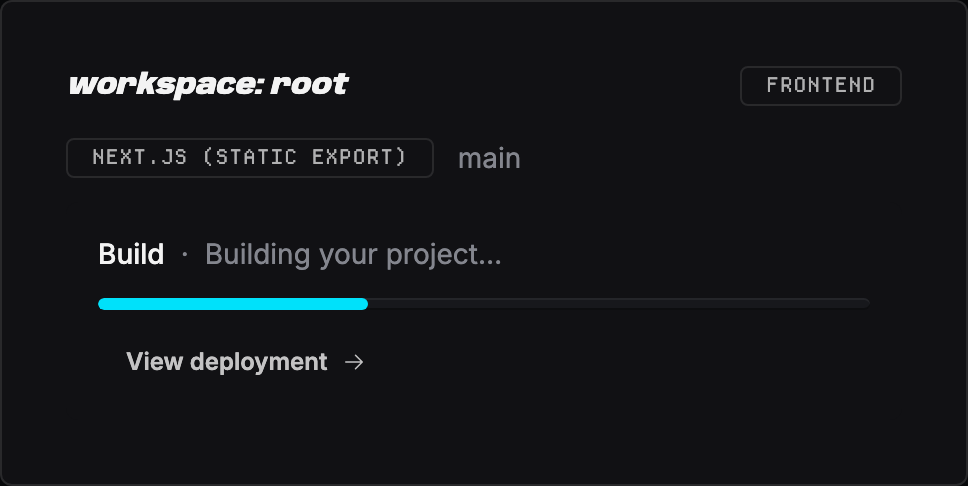
building shows here as the Build stage.| Status | Shown as | What's happening |
|---|---|---|
pending_workflow | Setup pending | First deploy only: the app opened a PR in your repo that adds the deploy workflow, and it's waiting for you to merge it. Use the Merge & deploy button in the app, or merge the PR on GitHub. The project card shows this; no deployment exists yet, so the deployment list is empty. |
queued | Queued | The workflow is dispatched; GitHub Actions hasn't picked it up yet |
installing | Installing | The Actions runner is installing dependencies |
building | Building | The build command is running |
uploading | Uploading | The build artifact is being uploaded to the app's backend |
pinning | Publishing | The backend is pinning the artifact to IPFS |
pinned | Pinned | App VM deploys only: the build is pinned and the VM's supervisor is picking it up. The app's health checks decide what happens next: live when it answers, failed when it never comes up. |
live | Live | The deployment is reachable at its gateway URL |
failed | Failed | A step above broke; see the error in the deployment row |
awaiting_resign | Re-authorization required | A deploy write was blocked because the app's delegate key is missing a grant from your wallet. The Redeploy button becomes Re-authorize, and one signature in Settings → Authorizations fixes it. See Keys & authorizations. |


pinned to live or failed.If a step fails, the row turns red and shows the last 50 lines of build output. Open the GitHub Actions run (link in the deployment row) for the full log.
A deployment that stops making progress is marked failed automatically, so you don't have to wait it out: after 45 minutes in queued, 30 in installing or uploading, 60 in building, and 15 in pinning. The check runs every 10 minutes. You can also end one yourself with Abandon (see Manage deployments).
What "live" means
When a deployment reaches live, three things become true:
- The artifact is pinned on IPFS. The build output has a CID (content identifier) and is reachable through any IPFS gateway.
- The CID is recorded on-chain. A STORE message references the CID, signed by our backend's delegate key authorized by your wallet.
- A gateway URL points at the CID. The deployment row shows a URL like
https://<cid>.ipfs.aleph.sh/.
You can also attach a custom domain so each deploy serves at your own host. Until you do, the gateway URL is the address, and it changes with every deploy because the CID does.
IPFS hosting quirks
IPFS gateways serve your build output as literal files. Two things that work on most traditional hosts don't work here:
Extension-less ("clean") URLs. A link to /about will 404 even if about.html exists, because the gateway doesn't rewrite URLs. Configure your generator to emit links with the .html suffix (for VitePress: cleanUrls: false), or to emit a directory per page (for a Next.js static export: trailingSlash: true). Directory links like /blog/ work when the directory contains an index.html.
Client-side routed deep links. A single-page app that handles /dashboard/settings in JavaScript will 404 when that URL is loaded directly, because there's no file at that path and no server to fall back to index.html. Use hash-based routing, pre-render every route to a real file, or accept that deep links only work via in-app navigation.
If your site renders at the gateway URL but internal navigation 404s, this is almost always why, not a broken deploy.
When something breaks
Common failures and where to look. States the dashboard names have their own section in Troubleshooting.
| Symptom | Cause | Fix |
|---|---|---|
Stuck at pending_workflow | The workflow PR hasn't been merged | Merge it: Merge & deploy in the app, or on GitHub |
Stuck at queued for >5 min | GitHub Actions runner queue is busy | Check the Actions tab of your repo on GitHub; if nothing moves, Abandon and redeploy |
Fails at installing | The install step failed. A single-package repo runs npm install --legacy-peer-deps. A monorepo workspace or a pnpm repo installs from the root lockfile (npm ci, pnpm install --frozen-lockfile or yarn install --frozen-lockfile), which refuses a lockfile out of sync with package.json | Run the install locally, commit the updated lockfile, and push |
Fails at building | Build command errored | Click into the deployment row to see the captured output; open the linked Actions run for the full log |
Fails at uploading | Over a limit: 200 MB unpacked, 10,000 files, 50 MB compressed, or the wallet's 100 deploys and 1 GB of uploads a day | Reduce the artifact (Build too large) or wait until the daily quota resets at UTC midnight |
| Fails with "Your wallet is out of credits" | The pin is charged to your wallet, which ran out of credits | Add credits in the credits console, then redeploy |
Fails at pinning | Storage network issue | Retry the deploy; transient |
Verification
You should now see:
- A deployment row in the live state on your project's detail page
- A gateway URL (
https://<cid>.ipfs.aleph.sh/) that, when clicked, renders your site - The Verify on-chain disclosure (closed by default in the deployment row), showing the chain of on-chain messages that produced the live state
Subsequent pushes to your repo's production branch redeploy automatically. No further configuration needed.
From here you can manage deployments (redeploy, roll back, abandon), set environment variables, or adjust build settings.
Working with an agent
An agent with a create key runs the whole uploaded site path alone; Keys & authorizations has the words it hands you to create that key. On a repo project, the import and the setup PR's merge are yours unless the agent can merge on GitHub: nothing on the agent API opens or merges a PR, and until the workflow is on the branch stasho deploy exits 3 saying the deploy workflow is not set up. After that an agent with a deploy key can start any later build with stasho deploy.
What the agent hands you, in these words:
text
Open the project page in the Stasho dashboard. If a Finish setup card shows, click Merge &
deploy (or Review on GitHub and merge it there). If the button reads Re-authorize, click it
and approve the signature. Watch the card until the deployment reads Live, then open
Deployments, click the new row and paste me its gateway URL. A server app has no gateway URL and
rests at Pinned until your App VM picks it up: paste me its project URL instead. If it reads
Failed, tell me.
How the agent verifies it afterwards. The repo and the gateway need no Stasho account. With gh signed in to an account that can read the repo (a monorepo workspace's file carries a suffix after stasho-deploy):
bash
gh pr list --repo $OWNER/$REPO --author app/stasho-deploy
gh run list --repo $OWNER/$REPO --workflow stasho-deploy.yml --limit 3
gh run view $RUN_ID --repo $OWNER/$REPO --log-failed
curl -s -o /dev/null -w '%{http_code}\n' "https://$CID.ipfs.aleph.sh/"
On a project that has never deployed, an open PR means setup is not done; one titled "Update Stasho deploy config" is a settings change waiting to be merged. With a read key, stasho deployments --project $PROJECT_ID lists each deployment's status, live flag, runId and url. It never returns the error text or the commit, which are encrypted to you, so a failure's cause comes from gh run view with that runId. An App VM app's url is null there, and a pinned entry waits for the VM: read its status document instead.
See it in the demo
The demo frontend project shows a completed IPFS deployment end to end, including the gateway URL and the Verify on-chain disclosure.